


Alarm Clock - Wake Up Gently
3.9487.00 Reviews
App Specs
- Version
- 4.6
- Updated On
- License
- Free
- Downloads
- 1,000,000+
- Developer
- NeonfzLLC
- Categories
- Productivity
- Platform
- Android
Screenshots

 Analysis by AppCompare
I judge an alarm app by a simple test: can I set it up quickly, trust it to fit my routine, and avoid unpleasant surprises when I reach for my phone? Alarm Clock - Wake Up Gently is a free productivity app from NeonfzLLC that brings everyday timekeeping tools together with a gentler wake-up approach. I’d consider it if I want more than the alarm built into my phone, while keeping in mind that an app’s reassuring presentation is not a substitute for checking its settings and how it behaves on my own device.
A practical place to begin
The app has a 3.9 average from around 5,500 ratings, with more than a million installs. That gives me some context for its reach, but popularity alone doesn’t tell me whether an alarm will work well for my particular schedule or phone. I’d treat the first few mornings as a trial: set an alarm for a time when waking up late would not cause trouble, then check the tone, volume, and snooze behavior before relying on it for an important commitment.
It is marked suitable for everyone, and the current version is 4.6. The app is free to install, with in-app purchases listed from $18.99 to $79.99 per item. I would look closely at any purchase screen before confirming anything, especially if I only want basic alarm functions. That’s a useful distinction: an app can be free to try without every optional item being free, so I’d decide what I actually need before spending.
Making the wake-up routine your own
I’d use this section to think through which alarm choices will make a real difference to my mornings, rather than adjusting every setting at once. Trying one change at a time—such as a different tone or a less tempting snooze routine—makes it easier to tell what actually helps, and sets up a closer look at the wake-up options themselves.
Gentle Wake-Up Experience
The standout feature of the Alarm Clock - Wake Up Gently app is its ability to wake you up softly and steadily. Instead of jolting awake to a blaring alarm, you get a gradual increase in volume. It’s almost like having your very own sunrise simulation, minus the actual sunlight. This is a game-changer for those of us who prefer a more peaceful start to the day.
That softer approach is most useful when the people around me are sleeping too, or when a sudden loud tone makes the first minutes of the day feel needlessly stressful. I’d still choose a sound that I can hear reliably: a gentle alarm is only helpful if it wakes me. A good way to find the balance is to test the chosen tone during the day at the volume I plan to use overnight, rather than discovering in the morning that it is too quiet or too easy to ignore.
Customization Galore
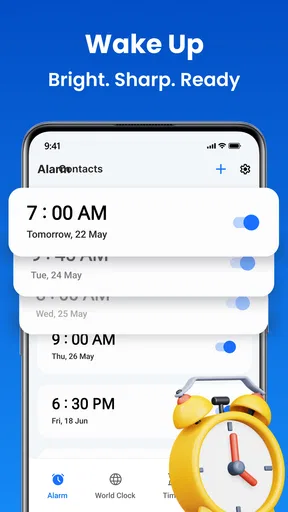
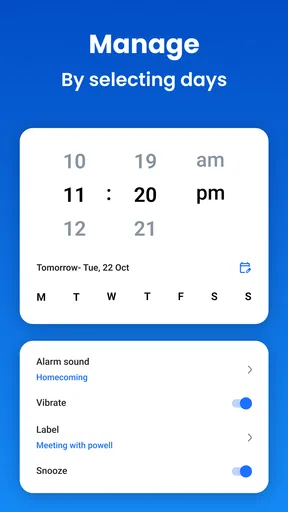
One of my favorite things about this app is how customizable it is. You can choose different alarm tones, whether you’re into nature sounds, your favorite playlist, or even just a classic beep. Plus, there’s an option to set multiple alarms with different settings, so if you need a backup (or two), you’re covered.
Worth Reading Before You Choose

EA SPORTS FC Mobile 26 Is a Bigger Football Game, but It Takes Time

Flipboard Shows What News Apps Must Do Beyond the Feed

Switching to Android Auto Means Rethinking Your Driving Routine

Google Calendar Makes a Crowded Week Easier to Manage

Ludo King Makes the Most of the Minutes Between Plans

Baby Panda World Brings Quick Play to Modern Phones, but Its Game Library Feels Busy
Multiple alarms are especially handy when weekdays and weekends do not follow the same rhythm, or when I have a one-off early start without wanting to alter my usual wake-up time. I’d give each alarm a clear purpose and avoid stacking several alarms only a few minutes apart. Too many backups can turn a helpful safety net into a long snooze session, and it becomes harder to tell which alarm is meant to get me out of bed.
Feeling adventurous? Try the random tone feature. It keeps things interesting and might even make waking up a little more fun. Just imagine not knowing what sound will greet you—and no, it’s never anything too crazy, so don’t worry about waking up to a foghorn!
Snooze Options
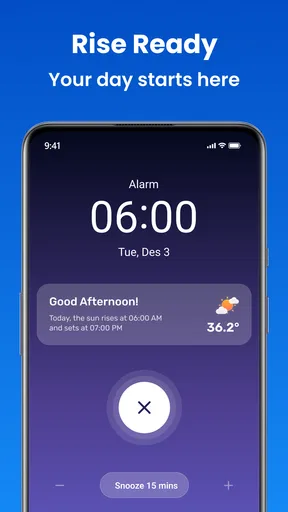
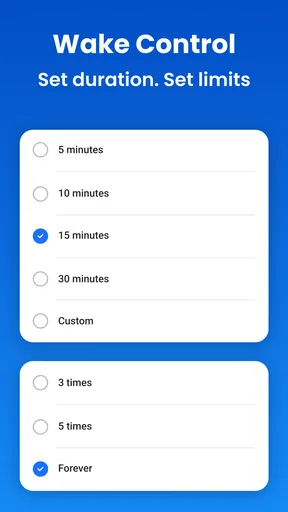
If you’re a chronic snoozer, this app has got you covered. You can set the snooze duration to anything that suits your needs. I personally appreciate the gentle nudge this feature gives me to actually get out of bed. The app even lets you shake your phone or solve a little puzzle to snooze, which is a clever way to make sure you’re really awake.
Those extra steps are a trade-off, not a cure for snoozing. A puzzle can interrupt the automatic habit of tapping snooze, but it may feel irritating if I’m groggy or have limited time. I’d use the least demanding option that genuinely helps me get moving, then change it if it adds frustration rather than helping. Before relying on a physical gesture, I’d also make sure the phone is somewhere I can reach without knocking it onto the floor.
Sleep Tracking
Now, I didn’t expect this feature, but it’s a neat addition. The app offers basic sleep tracking, letting you know how many hours you’ve slept. While it’s not as detailed as a dedicated sleep-tracking device, it’s enough to give you an overview of your sleep patterns. It’s a nice touch for those who want to be more mindful of their sleep habits.
I’d use that overview as a prompt for reflection, not as a diagnosis or a precise account of sleep quality. For example, if I keep setting alarms after late nights, a simple record of hours can help me notice that my schedule is the issue, rather than the alarm tone. Anyone who needs detailed sleep analysis should compare this with a dedicated tracker; the appeal here is having a basic sleep-related reference alongside the alarm, not replacing a specialist tool.
Useful beyond the morning alarm
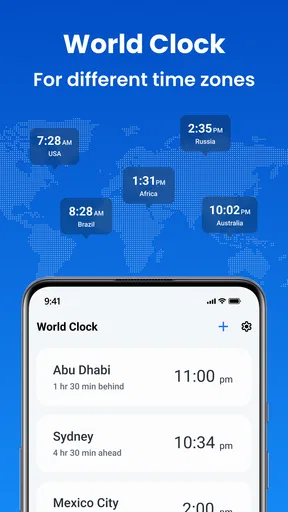
The app’s broader set of timekeeping tools makes it more useful than a wake-up screen alone. Its timer can help me keep a cooking task from drifting, while a stopwatch is handy for timing a workout interval or a short practice session. A world clock can be useful when I need to think through another time zone before arranging a call. These are small jobs, but having them in one place can save me from switching between separate apps.
A realistic routine might be setting a weekday alarm the night before, using a timer while breakfast is on the stove, and checking a world clock before messaging a friend abroad. I would not assume these tools automatically share settings or schedules; I’d treat each as its own task and check the screen before starting. That simple habit matters most when I am tired or in a hurry, because a timer and an alarm serve different purposes even though both involve counting time.
Compared with the default clock app, this one is worth considering if I specifically want gradual volume, varied snooze interactions, and several timekeeping tools together. The built-in option may still be better for someone who wants the simplest possible setup and has no interest in extra controls. Compared with a dedicated sleep app or a specialist alarm device, this app’s advantage is convenience; the trade-off is that it should not be treated as a full sleep-analysis system or a replacement for a separate alarm if missing a wake-up would have serious consequences.
User-Friendly Interface
I’m all about user-friendly interfaces, and this app doesn’t disappoint. The design is sleek and intuitive, so you won’t find yourself fumbling around trying to set your alarm. Everything is straightforward, making it easy for anyone to navigate, even if you’re not particularly tech-savvy.
For a new user, I’d take a few minutes to check the alarm screen and the available options before bedtime, rather than trying to learn them half-asleep. That is also a sensible moment to review any prompts the app displays and make deliberate choices. I don’t treat a clean interface as proof of particular privacy practices: trust should come from controls and explanations I can actually see, not from a polished design or an assumption about what happens behind the scenes.
Battery Efficiency
We’ve all been there: waking up late because our phone died overnight. Not with this app! It’s designed to be battery-efficient, so you can rest easy knowing it won’t drain your phone’s battery while you sleep. Of course, keeping your device charged is always a good idea, but it’s nice to have that extra peace of mind.
Even with an app designed to be efficient, I’d keep the phone charged and test the alarm on my own device before making it my only wake-up plan. Battery behavior can depend on how a phone is configured, so a first-night trial is a more useful check than relying on a general impression. If the alarm is essential for an early flight or an important appointment, I’d use a second reliable backup until I know the setup works consistently for me.
Who will get the most from it
I think this app makes the most sense for someone who wants a softer start, enjoys adjusting alarm behavior, or likes having a timer, stopwatch, and world clock close at hand. It can also suit a household where one person wants a gentler alarm and another is still asleep, provided the chosen tone is audible enough for the person who needs to wake. The ability to set multiple alarms is useful for different routines, but a little organization makes those alarms easier to manage.
I would skip it if I only need one basic alarm and do not want to explore extra options or purchase prompts. Someone who relies on strict sleep metrics, extensive scheduling integrations, or a dedicated physical alarm may be better served by a specialist alternative. And if interactive snoozing feels like a nuisance rather than a nudge, the app’s more involved approach may not improve the morning at all. The right choice depends on whether its particular controls solve a problem I actually have.
Final Thoughts
All in all, the Alarm Clock - Wake Up Gently app is a solid choice for anyone looking to improve their morning routine. It’s packed with features that cater to individual needs, whether you’re a heavy sleeper or just want a more pleasant wake-up experience. If you’re tired of your old, harsh alarm clock, give this app a try. It might just change how you feel about mornings.
Ready to start your day the gentle way? Check out the app on your preferred platform and see for yourself. You might just become a morning person after all!
Pros
- Customizable alarms to fit your schedule.
- Gentle wake-up feature minimizes jarring starts.
- User-friendly interface with intuitive controls.
- Wide range of soothing alarm sounds available.
- Option to integrate weather updates for planning.
Cons
- Limited free features; premium purchase needed.
- Occasional app crashes reported by users.
- Some users find ads intrusive in free version.
- Battery consumption can be high on older devices.
- Syncing with other apps can be unreliable.
FAQs for Alarm Clock - Wake Up Gently
What features does Alarm Clock - Wake Up Gently offer to enhance my waking experience?
Alarm Clock - Wake Up Gently offers a range of features designed to provide a pleasant waking experience. It includes customizable alarm tones, gradual volume increase, and ambient soundscapes. Users can set multiple alarms, choose between different themes, and even utilize a snooze function tailored to their preferences. Integration with smart devices adds convenience to your morning routine.
How does the gradual volume increase function work in Alarm Clock - Wake Up Gently?
The gradual volume increase feature is designed to ease users into waking up by slowly raising the alarm sound from a soft whisper to a louder tone over a set period. This helps reduce the jarring effect of a sudden loud alarm and can be adjusted according to user preference, ensuring a gentle start to the day.
Is Alarm Clock - Wake Up Gently compatible with both Android and iOS devices?
Yes, Alarm Clock - Wake Up Gently is available for both Android and iOS platforms. Users can download it from the Google Play Store or Apple App Store. The app is optimized for a variety of devices, ensuring a consistent experience regardless of your smartphone or tablet choice.
Can I use my own music or sounds as an alarm in Alarm Clock - Wake Up Gently?
Yes, Alarm Clock - Wake Up Gently allows users to personalize their alarms by using their own music or sounds. You can select tracks from your device’s library, ensuring that you wake up to a familiar or favorite tune. This feature adds a personal touch to your morning routine.
Does Alarm Clock - Wake Up Gently offer any additional features for heavy sleepers?
For heavy sleepers, Alarm Clock - Wake Up Gently includes enhanced features like multiple alarm settings, vibration options, and challenging wake-up tasks. Users can set alarms to repeat on specific days and choose to perform tasks like solving puzzles to ensure they are fully awake when turning off the alarm. These features are designed to make sure you never oversleep.


